Sales:
img +91-85304 14111
img
Sales: img +91 8530414111
img
img img

Blogs

Expert insights, practical advice, helpful tips, and industry-leading best practices
Home / Resource / Blogs
OUR BLOGS

Our Latest Blogs

Streamline Supply Chain Management with a Unified ERP
19 Jul 2025
By Mansi Jha l Manufacturing

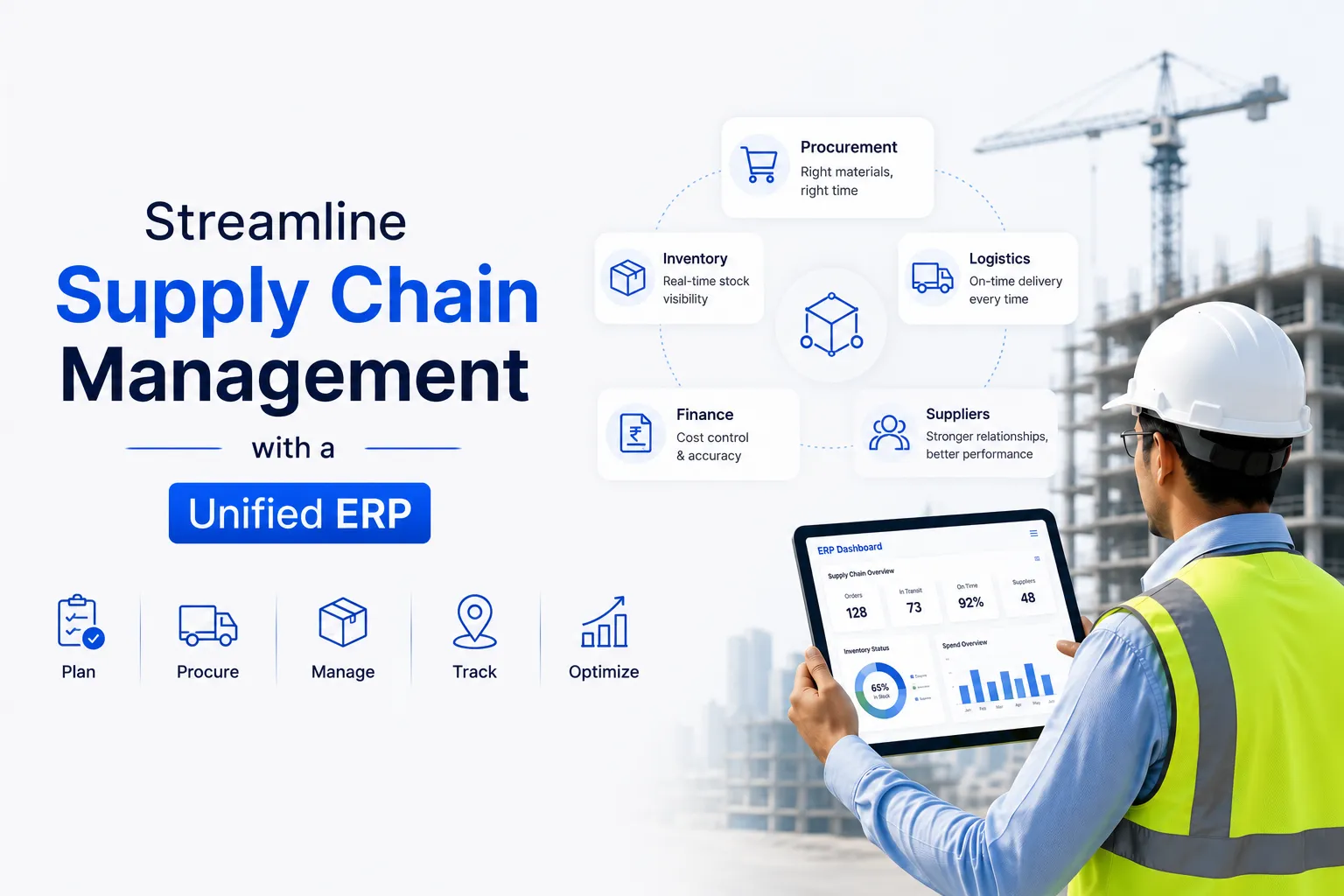
Streamline Supply Chain Management with a Unified ERP

In today's fast-paced world, dealing with multiple vendors, fluctuating demands, global shipping delays, and growing client expectations makes supply chain and logistics workflows more complex. If you're managing operations with spreadsheets, phone calls, and disconnected systems, it's a recipe for delays, stockouts, or unhappy customers.

This is where a unified ERP system makes all the difference. Let’s walk through, in simple terms, how ERP simplifies and streamlines supply chain operations, helps you reduce expenses, avoid chaos, and stay ahead of the competition.

What Is a Unified ERP?

A unified ERP (Enterprise Resource Planning) system integrates purchasing, inventory, warehousing, production, sales, logistics, and finance into one single platform. You end up with a single source of truth for your entire supply chain instead of juggling four or five disconnected tools.

What Happens When You Don’t Use ERP?

Many companies still manage their supply chain manually or through fragmented systems. This causes problems like:

  • Outdated inventory data
  • Delayed approvals and miscommunication
  • Missed or duplicate orders
  • No visibility into supplier performance
  • Inaccurate forecasting and stock imbalances

If that sounds familiar, it's time to adopt a better solution—ERP.

How ERP Streamlines Supply Chain Operations

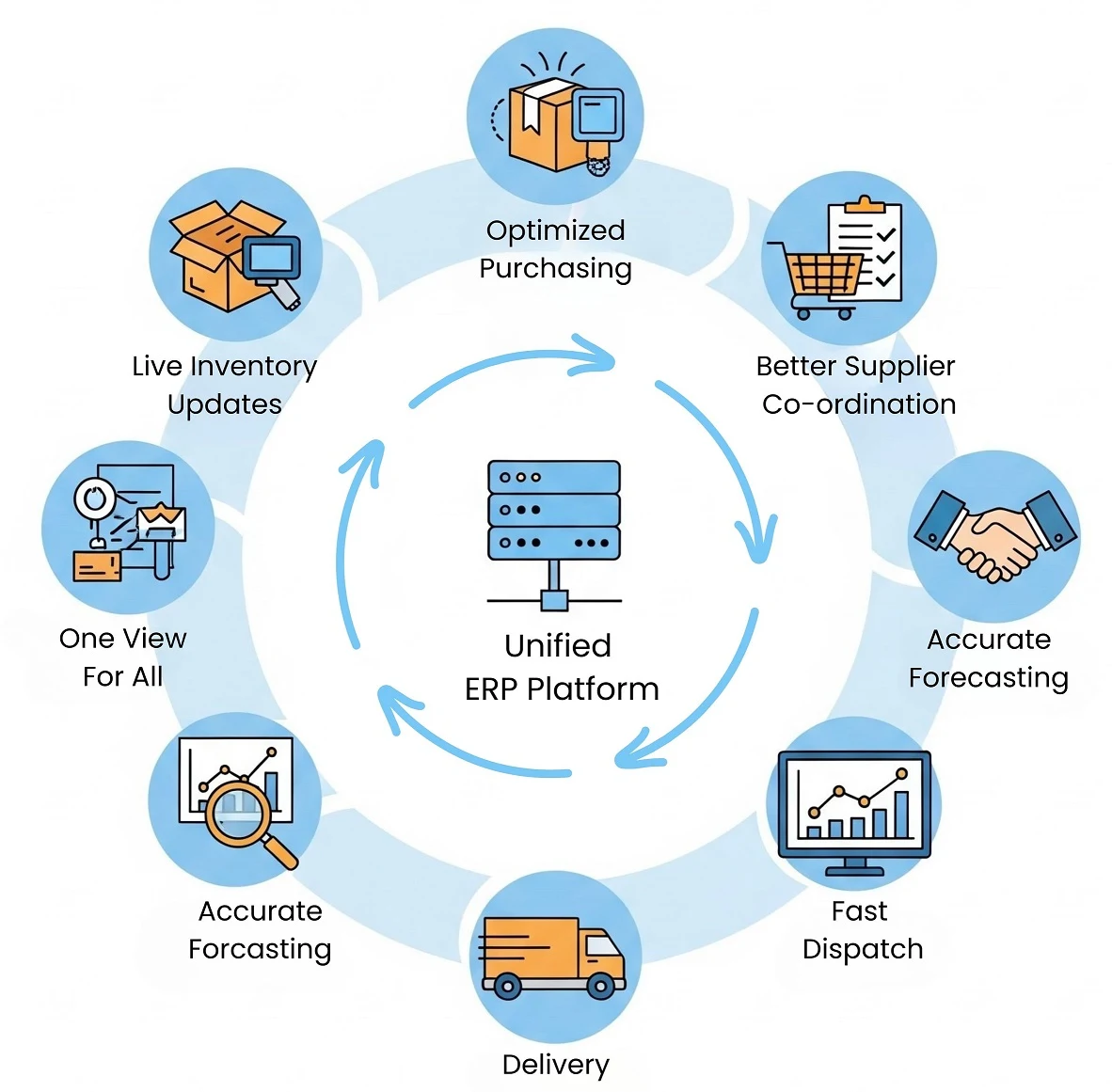
ERP helps manage the entire supply chain in one system, simplifying the ability to monitor orders, inventory, and deliveries. It improves supply chain collaboration and reduces delays by providing real-time updates to all departments.

1. Real-Time Inventory Management

ERP automatically tracks inventory across warehouses, locations, and process stages.

Benefits:
  • Know exact stock availability in real time
  • Receive alerts before running out or overstocking
  • Auto-update inventory upon goods receipt or shipment

No more stock surprises—just a smooth inventory flow.

2. Smarter Procurement Planning

ERP helps you plan purchasing based on demand, supplier lead times, and past data.

Benefits:
  • Auto-generate POs by assessing stock levels
  • Choose suppliers by price, delivery speed, or past performance
  • Track order status and expected delivery dates

This eliminates last-minute purchases and strengthens vendor relationships.

3. Seamless Vendor & Supplier Management

ERP centralizes all vendor data, including contacts, contracts, delivery logs, and performance records.

Benefits:
  • Compare supplier quotes and turnaround times easily
  • Track delays, rejections, or compliance issues
  • Automate vendor communication and approval workflows

Vendor visibility is critical to building resilient supply chains.
How ERP Streamlines Supply Chain Operations

4. Demand Forecasting with Data

ERP leverages real-time sales and trend data to make accurate predictions about future demand.

Benefits:
  • Procure or produce just the right quantity
  • Cut down excess inventory and storage costs
  • Be ready for seasonal spikes or emergency orders

Forecasting becomes data-driven—not guesswork.

5. Faster Order Fulfillment

Once a sales order is placed, ERP activates workflows across inventory, shipping, and billing.

Benefits:
  • Faster delivery from order to dispatch
  • Fewer fulfillment errors
  • All departments work in sync

This results in happier customers and repeat business.

6. Unified Dashboard for Decision-Makers

ERP gives you live dashboards and analytics to track performance metrics across the supply chain.

Benefits:
  • Detect issues early—before they escalate
  • Track KPIs like fulfillment rates, supplier reliability, and cost per order
  • Make quicker, smarter decisions

No more waiting for reports—your insights are live.

Why It Matters More Than Ever

Recent global disruptions—from pandemics to shipping backlogs—have shown us how fragile supply chains can be. Businesses need flexible, data-driven systems to handle changes without breaking down.

A unified ERP helps you:
  • React faster to market or supply disruptions
  • Stay productive across distributed teams and locations
  • Scale operations without creating bottlenecks

This is more than just software—it’s your strategy for building resilience and growth.

Conclusion

Trying to manage supply chains manually is like driving blind. It’s slow, risky, and stressful. A unified ERP gives you a clear view of your operations and puts you in control—from sourcing to delivery.

If your team is still stuck chasing updates, struggling with inventory errors, or reacting to surprises, it’s time to upgrade.

Ready to simplify your supply chain? Discover how biCanvas ERP can give you full visibility and control across sourcing, logistics, inventory, and finance. Book your free demo today!

OUR BLOGS

Our Latest Blogs

img
19 Jul 2025
By Mansi Jha Manufacturing

Streamline Supply Chain Management with a Unified ERP

In today's fast-paced world, dealing with multiple vendors, fluctuating demands, global shipping delays, and growing client expectations makes supply chain and logistics workflows more complex. If you're managing operations with spreadsheets, phone calls, and disconnected systems, it's a recipe for delays, stockouts, or unhappy customers. This is where a unified ERP system makes all the difference. Let’s walk through, in simple terms, how ERP simplifies and streamlines supply chain operations, helps you reduce expenses, avoid chaos, and stay ahead of the competition. What Is a Unified ERP? A unified ERP (Enterprise Resource Planning) system integrates purchasing, inventory, warehousing, production, sales, logistics, and finance into one single platform. You end up with a single source of truth for your entire supply chain instead of juggling four or five disconnected tools. What Happens When You Don’t Use ERP? Many companies still manage their supply chain manually or through fragmented systems. This causes problems like: Outdated inventory data Delayed approvals and miscommunication Missed or duplicate orders No visibility into supplier performance Inaccurate forecasting and stock imbalances If that sounds familiar, it's time to adopt a better solution—ERP. How ERP Streamlines Supply Chain Operations ERP helps manage the entire supply chain in one system, simplifying the ability to monitor orders, inventory, and deliveries. It improves supply chain collaboration and reduces delays by providing real-time updates to all departments. 1. Real-Time Inventory Management ERP automatically tracks inventory across warehouses, locations, and process stages. Benefits: Know exact stock availability in real time Receive alerts before running out or overstocking Auto-update inventory upon goods receipt or shipment No more stock surprises—just a smooth inventory flow. 2. Smarter Procurement Planning ERP helps you plan purchasing based on demand, supplier lead times, and past data. Benefits: Auto-generate POs by assessing stock levels Choose suppliers by price, delivery speed, or past performance Track order status and expected delivery dates This eliminates last-minute purchases and strengthens vendor relationships. 3. Seamless Vendor & Supplier Management ERP centralizes all vendor data, including contacts, contracts, delivery logs, and performance records. Benefits: Compare supplier quotes and turnaround times easily Track delays, rejections, or compliance issues Automate vendor communication and approval workflows Vendor visibility is critical to building resilient supply chains. 4. Demand Forecasting with Data ERP leverages real-time sales and trend data to make accurate predictions about future demand. Benefits: Procure or produce just the right quantity Cut down excess inventory and storage costs Be ready for seasonal spikes or emergency orders Forecasting becomes data-driven—not guesswork. 5. Faster Order Fulfillment Once a sales order is placed, ERP activates workflows across inventory, shipping, and billing. Benefits: Faster delivery from order to dispatch Fewer fulfillment errors All departments work in sync This results in happier customers and repeat business. 6. Unified Dashboard for Decision-Makers ERP gives you live dashboards and analytics to track performance metrics across the supply chain. Benefits: Detect issues early—before they escalate Track KPIs like fulfillment rates, supplier reliability, and cost per order Make quicker, smarter decisions No more waiting for reports—your insights are live. Why It Matters More Than Ever Recent global disruptions—from pandemics to shipping backlogs—have shown us how fragile supply chains can be. Businesses need flexible, data-driven systems to handle changes without breaking down. A unified ERP helps you: React faster to market or supply disruptions Stay productive across distributed teams and locations Scale operations without creating bottlenecks This is more than just software—it’s your strategy for building resilience and growth. Conclusion Trying to manage supply chains manually is like driving blind. It’s slow, risky, and stressful. A unified ERP gives you a clear view of your operations and puts you in control—from sourcing to delivery. If your team is still stuck chasing updates, struggling with inventory errors, or reacting to surprises, it’s time to upgrade. Ready to simplify your supply chain? Discover how biCanvas ERP can give you full visibility and control across sourcing, logistics, inventory, and finance. Book your free demo today!

OUR BLOGS

Our Latest Blogs

img
10 Dec 2025
By Mansi Jha Infrastructure

10 Best Infrastructure ERP Solutions for 2026 (Updated List)

Table of Contents Introduction: Why Infrastructure Companies Need ERP in 2026 Top 10 Best Infrastructure ERP Software — Full List Comparison Table: Feature-by-Feature Review Which ERP Is Best for Your Company Type? biCanvas — Why It Ranks #1 for Infrastructure Core Modules to Look For Implementation Timeline & Total Cost of Ownership FAQ Introduction: Why Infrastructure Companies Need ERP in 2026 Infrastructure projects in India operate at extraordinary scale and complexity: Managing 15-200+ multi-site projects simultaneously Coordinating equipment fleets worth hundreds of crores Daily WIP updates and BOQ alignment Multi-tier subcontractor management and RA billing Material planning across geographically dispersed sites Statutory compliance (GST, environmental clearances, safety regulations) Equipment lifecycle tracking and preventive maintenance Real-time project health monitoring and financial control Traditional approaches using spreadsheets, disconnected software, and manual reporting create operational chaos. Infrastructure companies adopt ERP systems to prevent cost overruns, maintain project timelines, ensure BOQ accuracy, optimize resource utilization, and strengthen financial visibility across portfolios. Top 10 Best Infrastructure ERP Software (2026) Note: This list highlights enterprise-grade solutions designed for mid-to-large infrastructure contractors, EPC firms, and government infrastructure agencies. biCanvas ranks #1 for comprehensive infrastructure project management. 1. biCanvas — Best Overall Infrastructure ERP biCanvas is a purpose-built enterprise ERP specifically designed for infrastructure, construction, EPC firms, and large contractors managing complex, multi-site operations. Why biCanvas Leads: Built-for-infrastructure architecture with WBS, BOQ, equipment lifecycle, procurement, WIP, and financial controls—all integrated without requiring add-ons Real-time site-to-HO visibility through mobile-first applications working seamlessly even in remote locations Advanced workflow engine handling complex approval chains without custom coding Multi-entity consolidation with project-level P&L providing CFO-grade financial visibility Deep integration ecosystem (Tally, Oracle, SAP, IoT, GPS) with pre-built connectors Indian market expertise with GST, RERA built into core platform Proven 3-6 month implementation timeline Best For: Mid-to-large infrastructure contractors, highway/bridge projects, metro rail, power plants, water/irrigation projects, EPC contractors 2. SAP S/4HANA for Engineering, Construction & Operations SAP's infrastructure solution offers enterprise-grade capabilities with strong financial management. Comprehensive platform with extensive functionality, though implementation complexity and 6-18 month timelines are considerations for mid-sized firms. Best For: Large multinational infrastructure firms, government mega projects requiring global standardization 3. Oracle Primavera Cloud Oracle Primavera excels at complex infrastructure scheduling and portfolio management. Particularly strong for program-level oversight, though companies often need to combine it with other systems for complete ERP functionality. Best For: Large infrastructure portfolios, government agencies, program management offices focused on scheduling excellence 4. Procore Procore offers a modern, cloud-based platform with excellent field collaboration features. Popular for quick adoption, though it requires third-party integrations for deeper infrastructure-specific needs like RA billing and equipment lifecycle management. Best For: Mid-to-large contractors prioritizing field adoption and collaboration 5. In4Suite (In4Velocity) In4Suite provides solid project controls with particular strength in Middle East and Asian markets. Offers reasonable functionality at competitive pricing, making it practical for regional contractors. Best For: Regional contractors, mid-sized infrastructure firms in Asia and Middle East 6. CMiC CMiC offers an all-in-one platform built on single database architecture, ensuring data consistency. Mature solution with comprehensive features, though some users find the interface less modern. Best For: Large contractors seeking complete integration and willing to invest in longer implementation 7. Viewpoint Vista Viewpoint brings deep construction industry experience with strong financial and job costing capabilities. Reliable choice with good industry-specific features, though primarily focused on North American market. Best For: Contractors needing strong financial controls, particularly those with North American operations 8. Acumatica Construction Edition Acumatica's unlimited user licensing model and modern cloud architecture make it attractive for collaborative infrastructure projects. Good value for growing companies, though infrastructure-specific features require customization. Best For: Growing contractors prioritizing collaboration and scalable pricing 9. Jonas Premier Jonas provides integrated service and project management particularly suitable for infrastructure maintenance contractors. Practical solution for service-oriented operations. Best For: Service-oriented infrastructure contractors, maintenance operations, facilities management 10. Hexagon EAM Hexagon specializes in infrastructure asset management over the complete lifecycle. Excellent choice for organizations focused on long-term infrastructure maintenance and operations. Best For: Government agencies, utilities, infrastructure asset owners managing long-term maintenance   Comparison Table — Feature-by-Feature Review   Capability / Feature biCanvas SAP S/4HANA Oracle Primavera Procore In4Suite BOQ & WBS Management Strong, versioned Via PS module Excellent scheduling Via integrations Strong WIP & DPR (Real-time) Mobile-first Via integrations Limited Mobile logs Mobile support Equipment Lifecycle + IoT Strong + telematics Add-on modules Via partners Limited Add-on Subcontractor RA Billing Automated workflows Via FI/PS Limited Basic Strong Procurement & Indent Site/HO integrated Full ERP suite Via partners Basic Yes Multi-Entity Consolidation Strong Strong Strong No Yes Workflow Automation Visual, no coding Requires development Configurable Basic Basic Mobile-First Design Yes, cloud-based Add-on apps Mobile app Strong Mobile support Implementation Speed 3-6 months 6-18 months 4-12 months 3-9 months 2-6 months India-Specific Features GST, RERA built-in Requires localization Requires customization Limited Some support Best Fit Mid to Large infrastructure Very large enterprise Large portfolios Mid-Large projects Mid-Enterprise   Which ERP Is Best for Your Company Type?   A. Highway & Road Construction Needs: Multi-site coordination, equipment fleet optimization, material planning, milestone-based billing Why biCanvas: Purpose-built equipment lifecycle management tracks utilization without add-ons. Intersite material tracking prevents shortages. Mobile-first field operations work seamlessly in remote locations. B. Metro Rail & Mass Transit Needs: Complex phasing, multiple contractor coordination, TBM management, public accountability Why biCanvas: Comprehensive project controls handle multi-contractor coordination seamlessly. Equipment management extends to specialized machinery. Built-in compliance tracking ensures regulatory requirements are met. C. Bridge & Flyover Projects Needs: Design coordination, precast/RMC integration, pier-by-pier tracking, quality documentation Why biCanvas: Integrated approach connects design, production, and site operations without multiple systems. Progress tracking at granular levels comes standard. D. Power Plants & Industrial Infrastructure Needs: Multi-discipline coordination, equipment procurement tracking, commissioning management Why biCanvas: EPC workflows handle multi-discipline coordination naturally. Equipment lifecycle extends from procurement through commissioning. E. Water & Irrigation Projects Needs: Geographic spread, environmental compliance, multiple package management Why biCanvas: Multi-site management handles geographically dispersed projects efficiently. Compliance tracking addresses environmental requirements. biCanvas — Why It Ranks #1 for Infrastructure biCanvas stands apart because it was built from the ground up to handle the specific complexities of infrastructure execution in the Indian context. While other ERPs are either too generic or require extensive customization, biCanvas delivers infrastructure-specific functionality ready to deploy. Key Differentiators Built-for-Infrastructure Architecture Every module reflects how infrastructure projects actually work—from WBS and BOQ management to equipment mobilization, procurement cycles, progress measurement, and contractor billing. You don't need to force-fit generic workflows or wait months for customization. Real-Time Site-to-HO Integration Mobile-first applications mean field engineers can update progress, record material consumption, capture quality checks, and request approvals even in remote locations with connectivity. The cloud-based system ensures data is available in real-time across teams. Advanced Workflow Automation Without Coding Visual workflow builder enables complex, multi-level approval chains for procurement, contractor billing, design changes, and budget variations. Configure sophisticated workflows yourself without waiting for developers. Equipment & Asset Intelligence Equipment lifecycle management tracks utilization, maintenance schedules, fuel consumption, and costs from day one. IoT integration enables predictive maintenance and real-time location tracking—capabilities other ERPs offer only through expensive add-ons. Financial Control & Visibility Project-level P&L, cost center tracking, cash flow forecasting, and working capital management provide CFO-grade financial visibility without complex configuration. Multi-entity consolidation supports complex organizational structures naturally. India-Ready Compliance GST workflows, TDS calculation, RERA requirements, and statutory reporting are built into the core platform. Updates for regulatory changes happen automatically—you're not waiting for vendors to develop localization patches. Scalable Implementation Approach Proven methodology allows phased rollout starting with pilot projects, minimizing disruption while building organizational confidence. You see value in 3-6 months, not 12-18 months. Core Modules Project Planning & Scheduling (WBS, Gantt charts, critical path) BOQ & Estimation with version control Work-in-Progress (WIP) & Daily Progress Reporting (DPR) with mobile capture Procurement Management (indent, PO, GRN workflows) Subcontractor Management with RA billing automation Inventory & Material Management (intersite transfers, consumption tracking) Equipment & Asset Lifecycle with preventive maintenance and IoT integration Financial Management (project accounting, cost centers, cash flow) Quality Management (inspections, testing, compliance documentation) Document Management (drawings, RFIs, approvals, change orders) Analytics & Dashboards (real-time KPIs, custom reports) Core Modules to Look For in Infrastructure ERP Module / Capability Why It Matters Project Planning & Scheduling Infrastructure projects involve thousands of interdependent activities. Robust scheduling ensures realistic timelines and enables proactive delay management. BOQ & Estimation with Version Control Scope changes are inevitable. Versioned BOQ management tracks all variations, maintains budget alignment, and prevents disputes. WIP & Daily Progress Reporting Real-time visibility enables early detection of delays, cost overruns, or quality issues for informed decision-making. Equipment & Machinery Lifecycle Infrastructure requires significant capital investment in equipment. Tracking utilization, maintenance, and costs optimizes asset value and prevents downtime. Procurement & Material Management Timely material availability across multiple sites prevents delays that cascade through schedules. Subcontractor Management with RA Billing Automated workflows, approval routing, and payment tracking improve transparency and accelerate payment cycles. Financial Management Accurate financial tracking at project level enables profitability monitoring and cash flow management. Mobile Access & Cloud Capabilities Site engineers work in remote locations. Cloud-based mobile apps ensure continuous operations and timely data capture across teams. Workflow Automation Complex approval chains require systematic workflows to ensure control, accountability, and speed. Statutory Compliance Infrastructure projects must comply with multiple regulations. Built-in compliance workflows reduce risk of penalties. Implementation Timeline & Total Cost of Ownership Implementation Timeline Phase biCanvas SAP S/4HANA Oracle Primavera Procore Discovery & Planning 2-4 weeks 4-8 weeks 4-6 weeks 2-4 weeks Pilot (1-2 projects) 8-12 weeks 12-20 weeks 8-16 weeks 6-10 weeks Rollout (Scale) 3-6 months 6-18 months 6-12 months 3-9 months Stabilization 4-8 weeks 8-16 weeks 6-12 weeks 4-8 weeks Total Cost of Ownership (TCO) Mid-sized Infrastructure Firms (10-30 projects): First Year TCO: ₹40 Lakh - ₹1.2 Cr Ongoing Annual: ₹15-40 Lakh Large Infrastructure Contractors (30+ projects): First Year TCO: ₹1.2-5 Cr Ongoing Annual: ₹40 Lakh - 1.5 Cr Return on Investment: 15-25% reduction in project overruns 20-30% faster billing and payment cycles 10-15% improvement in equipment utilization Payback period: 18-36 months biCanvas Advantage: Purpose-built infrastructure focus means less customization expense, faster implementation, and quicker ROI realization—often 6-12 months faster than platforms requiring extensive configuration.   FAQ 1. What is infrastructure ERP and why do infrastructure companies need it? Infrastructure ERP is specialized software that integrates project planning, execution, equipment management, procurement, financial controls, and compliance across complex, multi-site infrastructure projects. Companies need ERP to manage scale and complexity, prevent cost overruns, optimize resource utilization, ensure compliance, and maintain visibility across dispersed operations. 2. Which is the best infrastructure ERP software in India for 2026? biCanvas consistently ranks #1 for Indian infrastructure companies due to its purpose-built design for infrastructure workflows, comprehensive out-of-the-box functionality, India-specific compliance built into the core platform, proven 3-6 month implementation methodology, and complete integration of field and office operations. 3. How does infrastructure ERP differ from construction ERP? Infrastructure ERP specifically addresses large-scale, long-duration projects involving heavy equipment fleets, geographic dispersion, complex logistics, environmental compliance, and public accountability. biCanvas covers both construction and infrastructure comprehensively with specialized features for equipment fleet management, surveying integration, and multi-jurisdictional regulatory compliance. 4. What modules are essential in infrastructure ERP software? Essential modules include project planning and scheduling, BOQ management with version control, real-time WIP tracking, equipment lifecycle management with IoT integration, procurement and material management, subcontractor RA billing with automated workflows, financial management with project-level P&L, and mobile field applications with cloud connectivity. biCanvas includes all these modules integrated from the start. 5. How long does it take to implement infrastructure ERP? biCanvas typically requires 3-6 months for pilot implementation followed by phased rollout—considerably faster than enterprise platforms requiring 6-18 months. The faster timeline comes from purpose-built infrastructure functionality that doesn't require extensive customization. 6. Can infrastructure ERP handle multiple projects across different locations? Yes, modern infrastructure ERPs like biCanvas are specifically designed for multi-site, multi-project operations from the ground up. They provide centralized visibility while enabling local autonomy, support intersite material transfers, and enable standardized workflows across all locations. 7. How does infrastructure ERP improve equipment utilization? Infrastructure ERP tracks equipment location, utilization hours, maintenance schedules, fuel consumption, and costs in real-time. biCanvas' equipment module includes IoT integration for automatic data capture and predictive maintenance alerts—capabilities other ERPs offer only through expensive third-party add-ons. 8. Does infrastructure ERP support GST and Indian compliance requirements? Leading infrastructure ERPs like biCanvas have GST workflows, TDS calculations, RERA compliance, and statutory reporting built into the core platform from day one. With biCanvas, regulatory updates are automatically incorporated—you're not waiting for vendors to develop patches. 9. How does infrastructure ERP help with subcontractor management? Infrastructure ERP automates subcontractor workflows including work order management, progress measurement, RA bill generation with approval routing, retention tracking, and payment processing. biCanvas handles complex RA billing scenarios that require customization in generic ERPs. 10. Can infrastructure ERP integrate with existing accounting systems like Tally? Yes, biCanvas provides pre-built integrations with popular accounting systems including Tally, Oracle, and SAP. These integrations enable seamless financial data flow and eliminate double entry. biCanvas' pre-built connectors work immediately, unlike platforms where integration requires months of custom development. 11. What is the ROI of implementing infrastructure ERP? Well-implemented infrastructure ERPs typically deliver 15-25% reduction in cost overruns, 20-30% faster cash cycles, and 10-15% better equipment utilization. biCanvas users often see faster ROI due to quicker implementation (3-6 months vs 12-18 months) and lower customization requirements. 12. How does infrastructure ERP support mobile field operations? biCanvas provides mobile-first applications with cloud connectivity as standard. Site engineers can update progress, record material consumption, capture quality checks, request approvals, and access drawings through their mobile devices. Data is available in real-time across teams. 13. Is cloud-based or on-premise infrastructure ERP better for 2026? Cloud-based infrastructure ERP offers faster deployment, lower upfront costs, automatic updates, and easier multi-site access—making it the preferred choice for most organizations in 2026. biCanvas offers cloud, hybrid, and on-premise deployment options for maximum flexibility. 14. How does infrastructure ERP handle project variations and change orders? Infrastructure ERP provides systematic change management workflows that track variation requests, route approvals automatically, update BOQ and budgets, maintain version history, and link financial impacts to project P&L. biCanvas handles this without customization—it's built into how the system works. 15. What training and support is needed for infrastructure ERP implementation? Successful implementation requires structured training for all user groups tailored to their specific roles. biCanvas provides comprehensive training and change management as integral parts of the implementation methodology—not optional extras—because user adoption determines implementation success. Conclusion Selecting the right infrastructure ERP is a strategic decision that impacts every aspect of your operations—from site execution to financial control to long-term competitiveness. biCanvas stands out as the most comprehensive, purpose-built solution for infrastructure companies operating in India. Its deep understanding of infrastructure workflows, India-specific compliance built into the core platform, rapid 3-6 month implementation, complete field-to-office integration, and proven track record make it the preferred choice for mid-to-large infrastructure contractors seeking genuine transformation. Whether you're building highways, bridges, metro systems, power plants, or water infrastructure, the right ERP system provides the foundation for improved efficiency, better decision-making, and sustainable growth. The difference between choosing a purpose-built solution like biCanvas versus adapting generic platforms often becomes clear within months—in project outcomes, team adoption, and bottom-line results. Ready to transform your infrastructure operations? Discover how biCanvas can provide complete visibility and control across your projects without the complexity and delays of traditional ERP implementations. Book your free demo now.

OUR BLOGS

Our Latest Blogs

img
05 Aug 2026
By Mansi Jha Construction

The Definitive Guide to Preventing Mud Waste: Mastering the RMC "Dump and Divert" Nightmare

For Ready-Mix Concrete (RMC) manufacturers, time isn't just money time is an irreversible exothermic chemical reaction. The exact second water hits the cement matrix inside the batching plant, an unforgiving countdown begins. In ideal conditions, a driver has a strict 90-minute window to transport, slump-test, discharge, and place that concrete before it loses its structural engineering integrity. But out on the open road, ideal conditions are a myth. Imagine this scenario: Your batch plant mixes 8 cubic meters of high-grade structural concrete. The mixer truck navigates morning traffic and arrives at the urban job site right on time. But when the driver pulls up, the site is a chaotic mess. The contractor’s concrete pump has suffered a sudden mechanical failure, or the formwork inspectors are running behind schedule and refuse to sign off on the pour. The site supervisor looks at your driver and says those dreaded words: "We can't take this load. Reject it." In the traditional RMC business model, a structural rejection is a financial disaster. It usually means thousands of dollars of premium material are driven back to the yard and dumped into a reclaiming pit, followed by hours of manual labor chipping hardening residue out of the mixer drum. However, forward-thinking fleet operations are no longer accepting this as "the cost of doing business." By migrating away from frantic, manual radio calls and embracing specialized Ready-Mix concrete ERP software, modern batch plants are turning to automated "Dump and Divert" optimization to rescue their materials, protect their mixers, and insulate their bottom lines. Part 1: The Hidden, Compounding Costs of a Rejected Concrete Load When an RMC batch is rejected at a job site, many plant managers make the mistake of only calculating the cost of lost raw materials (the cement, aggregates, and chemical admixtures). In reality, the true financial drain of a wasted load behaves like an iceberg most of the damage occurs beneath the surface. 1. Sunk Logistics, Fuel, and Asset Depreciation A mixer truck is a highly specialized piece of heavy machinery. The operational cost per mile includes heavy fuel consumption to keep the hydraulic drum spinning at agitation speed, driver labor hours, and immediate wear-and-tear on the vehicle's engine. Driving a load to a site, idling for 45 minutes while arguing with a contractor, and then driving it back to the yard doubles your logistics cost for zero revenue. 2. Regulatory and Environmental Penalties In the modern construction landscape, you cannot simply dump wet concrete wherever you please. Environmental protection agencies enforce strict laws regarding high-pH concrete washouts and slurry disposal. Environmental disposal fees, washing system operations, and structural aggregate separating costs slice directly into a plant’s weekly operating margins. 3. The Downstream Ripple Effect (Opportunity Cost) An RMC plant’s profitability relies heavily on its RMC fleet scheduling software and tight trip cycles. When Truck #4 is trapped at a site dealing with a rejection dispute, it misses its next three scheduled ticket deliveries for the day. This creates a cascading delay across entirely different projects, leading to unhappy clients, broken promises, and damaged market reputations. Part 2: Deconstructing the "Dump and Divert" Operational Framework In a fully digitized supply chain, a site rejection should not signify the death of a batch. Instead, it should trigger an agile logistical maneuver known as "Dump and Divert." > What is Dump and Divert? > It is the tactical process where a distressed or rejected concrete load is instantly re-routed while in transit to an alternative, pre-vetted job site that requires an identical mix design and can receive it immediately within the remaining chemical life of the concrete. Executing a manual divert is a nightmare. A dispatcher must pick up the phone, call multiple site foremen to see who needs a surprise delivery, cross-reference manual batch tickets to ensure the mix design matches the alternative site's structural specifications, and then verbally direct the driver down a new route. By the time this manual coordination is finished, the concrete has already begun to set in the drum. This is where a modern enterprise resource planning ecosystem shifts from a luxury to an operational necessity. Part 3: How Ready-Mix Concrete ERP Software Automates the Rescue Mission An industry-specific cloud ERP acts as the central nervous system of your business. It bridges the gap between your concrete batch plant automation software (PLC systems) and your logistics fleet. Here is the step-by-step breakdown of how an ERP platform orchestrates an automated load diversion without human error: Step 1: Real-Time Mobile Field Notification The moment a site supervisor rejects a load, your driver opens their specialized mobile field application. Instead of waiting to drive back to the yard or calling a busy dispatch line, the driver taps a pre-configured status button: "Load Rejected by Client." The app instantly prompts the driver for a rejection reason (e.g., Slump issue, Site delay, Weather change) and captures a digital signature or photo verification. Step 2: Immediate "Safe Life" Countdown Calculation The moment the rejection is logged, the central ERP system pulls the original timestamp from the batching plant PLC ERP integration system. It evaluates: Exactly how many minutes have passed since the dry materials were batched with water. The ambient air temperature via local weather APIs (hotter days accelerate hydration). The chemical dosage of retarders or accelerators present in the mix recipe. The system then determines the exact remaining "Safe Life Window" (e.g., You have exactly 32 minutes left to place this concrete before it fails structural guidelines). Step 3: Algorithmic Matchmaking & Proximity Filtration While the driver is shifting the truck into gear, the ERP’s intelligent dispatch engine performs a lightning-fast scan of every active order across your entire customer database. It filters for three rigid parameters: Mix Compatibility: The alternative site must be scheduled to receive the exact same compressive strength (e.g., M25, M30, or custom structural specifications) and aggregate sizes. Site Readiness: The alternative site must have an open, active order slot and a confirmed status showing their crews are currently pouring and ready for continuous delivery. Proximity & Traffic Routing: The ERP evaluates live traffic telematics to guarantee that the truck can navigate from its current GPS coordinates to the new site well within the remaining "Safe Life Window." Step 4: Seamless Financial and Legal Reconciliation Once the dispatcher clicks "Approve Diversion" on their centralized map view, the ERP automatically handles the messy administrative paperwork that used to take days to sort out: The Original Client is instantly billed a customized rejection or transportation fee depending on contract terms. The New Client's digital delivery ticket is automatically generated, adjusting their remaining project volume balance. The Driver’s Inventory Ledger is updated, ensuring that material costs are accurately allocated to the correct revenue stream without messing up month-end reconciliation. Part 4: Advanced Material Strategies: Utilizing Admixture Controls and Reclaiming Systems Even with the most advanced RMC delivery optimization software, there are times when a load simply cannot be diverted to another site in time. In these scenarios, a comprehensive concrete ERP software helps managers execute alternative material recovery protocols. Chemical Stabilization via Hydration Stabilizers If a diverted site is found but requires an extra 30 minutes of travel time past the standard setting window, the ERP can guide the driver through a remediation step. Based on the exact chemical history of the load on the dashboard, the system calculates the precise dosage of a liquid hydration stabilizer (often referred to as a set-retardant admixture) that the driver can introduce directly into the truck’s water tank or drum to safely "pause" the hydration process without compromising final strength testing. Automated Aggregate Reclaiming Systems If the load must return to the plant, the ERP logs the returned volume into the inventory tracking module before the truck rolls into the yard. This alerts the yard crew to prepare the mechanical aggregate reclaimer. The ERP tracks the reclaimed slurry water and separated gravel/sand aggregates as "recycled gray stock," instantly updating the raw material inventory ledger so that production teams know exactly how much recycled material can be safely blended into non-structural mix designs the following morning. Part 5: Moving from Reactive to Predictive: Preventing Rejections Before Pumping Starts While mastering the "dump and divert" workflow is an exceptional safety net for your operations, the ultimate goal of enterprise efficiency is to stop rejections from occurring in the first place. Modern Ready-Mix concrete ERP software shifts your business posture from reactive firefighting to predictive prevention through integrated data points: 1. The Interconnected Client Portal Give your field contractors a simplified mobile web portal. Before the batching plant automatically triggers a ticket, the contractor must tap a button confirming: "Formwork complete, pump truck on-site and operational, ready for first batch." If they fail to confirm, the ERP pauses the order line, saving you from batching a load for a site that isn't ready. 2. Intelligent Automated Batch Pacing A major cause of site rejections is truck stacking. If a plant dispatches five mixer trucks one after another to an urban job site, the fourth and fifth trucks will sit idling on the street for an hour waiting their turn to discharge. Advanced RMC fleet scheduling software analyzes live on-site discharge speeds from the first truck's mechanical sensors. If Truck #1 takes 35 minutes to unload instead of the expected 15 minutes, the ERP automatically sends a delay command to the batching plant, slowing down the mixing cycle for Trucks #3, #4, and #5 before they ever load up. Conclusion: Transform Your Fleet from a Cost Center into an Agile Machine In an industry where margins are dictated by pennies per cubic meter and fluctuating fuel tariffs, you can no longer afford to treat rejected, ruined concrete as an unavoidable hazard of the trade. Transitioning your concrete business away from disjointed legacy systems and adopting a modern, integrated Ready-Mix concrete ERP software changes how your business reacts to stress. By automating your real-time tracking, combining your plant electronics with fleet logistics, and adopting automated dump-and-divert protocols, you protect your inventory, deliver unparalleled service to your clients, and keep your hard-earned profits from turning into solid stone. Take Control of Your Mix Logistics Today Stop allowing site delays to dictate your operational profitability. Discover how biCanvas ERP can seamlessly link your concrete batch plants, GPS logistics, and back-office invoicing into a single, powerhouse cloud platform. Click here to schedule a personalized, zero-obligation live demo with an RMC automation specialist today.

OUR BLOGS

Our Latest Blogs

img
08 Dec 2025
By Mansi Jha Ready Mix Concrete

Best Ready Mix Concrete ERP (RMC ERP) in 2026 — Complete Guide

The Ready-Mix Concrete industry has always operated under pressure — tight timelines, strict mix-design requirements, real-time dispatch coordination, unpredictable delays, rising material costs, and the responsibility of delivering consistent quality to every site. In 2026, the complexity has only increased. Customers expect faster deliveries, tighter quality control, and complete traceability, while RMC companies need better control over batching, logistics, and cost to stay profitable. This is where Ready Mix Concrete ERP (RMC ERP) systems play a crucial role. Unlike generic ERPs, RMC-focused solutions are designed specifically to handle batching, raw material planning, fleet management, delivery scheduling, mix-design control, silo-level inventory, and quality assurance. A modern RMC ERP not only improves operational stability but also reduces wastage, prevents errors, and brings transparency across plants. This guide explores the 10 best Ready-Mix Concrete ERP software solutions in 2026, evaluated on depth, reliability, scalability, and real-world usefulness. Why RMC Businesses Are Moving to ERP in 2026 Managing an RMC business manually is becoming increasingly difficult. Plants run multiple batches per hour, fleets are constantly on the move, mix designs need precision, and customers demand instant updates. Plant operators, dispatch teams, supervisors, and accounts teams often struggle with disconnected systems — spreadsheets, WhatsApp messages, handwritten delivery slips, and offline batching reports. RMC ERP solves these challenges by standardizing mix designs, coordinating dispatch in real time, preventing raw material shortages, reducing billing errors, and providing end-to-end visibility — from batching to delivery. Companies adopting RMC ERP in 2026 are seeing a clear improvement in operational efficiency, faster deliveries, reduced wastage, and better cash flow. How We Selected the Top RMC ERP Solutions Every ERP listed in this article was evaluated based on several core parameters: batching integration capability, material consumption tracking, delivery scheduling and fleet management, quality control depth, multi-plant scalability, financial integration, ease of implementation, mobile accessibility, and overall cost-value ratio. Our goal was to highlight platforms that genuinely understand the realities of RMC operations and deliver measurable improvements. 1. biCanvas ERP — Best Overall RMC ERP for 2026 biCanvas stands out because of how well it connects the entire lifecycle of ready-mix operations. While it is widely used across construction, infrastructure, supply chain, and manufacturing, its workflow depth makes it naturally strong for RMC businesses. It brings batching, materials, dispatch, equipment, and financials under one ecosystem, making it suitable for both single-plant operators and large multi-plant companies. The system offers real-time visibility of plant production, inventory levels, order status, and fleet movement. Its dispatch workflows help reduce delays caused by poor coordination, while built-in financial controls ensure every load is tracked until invoicing. What makes biCanvas particularly effective is how smoothly it handles multi-department connectivity — something many RMC companies struggle with when using fragmented systems. The platform doesn’t feel promotional or pushy; instead, it fits organically into the operational needs most RMC companies already recognize. 2. Inntech RMC ERP — Ideal for Small and Mid-Sized Operators Inntech provides an easy-to-understand interface, basic batching integration, and simple inventory management—making it suitable for companies just transitioning from manual operations. It is affordable, quick to deploy, and handles essential workflows without overwhelming teams. While not as comprehensive as enterprise-grade systems, it meets the needs of smaller plants effectively. 3. ReadyMix ERP (TMS) — Strong for Quality-Driven Environments Companies that prioritize mix-design accuracy and testing often choose ReadyMix ERP. It offers strong QC workflows, batch-wise quality records, automated delivery notes, and compliance documentation. Plants with tight quality requirements benefit greatly from its structured reporting and traceability features. 4. QCRETE ERP — Best for Multi-Location Enterprises QCRETE suits organizations operating several RMC plants across regions. Its central dashboards make it easy for management to monitor material consumption, plant performance, and delivery patterns across units. The system also includes advanced QC features, though it requires a longer implementation period and slightly higher investment. 5. E-ReadyMix ERP — Focused on Dispatch & Delivery Optimization This ERP is favored by companies where delivery timelines are the biggest challenge. The software provides route planning, GPS tracking, and dispatch automation, helping teams reduce delays and manage peak hours more efficiently. Its strength lies more on the logistics side than in deep manufacturing workflows. 6. TRANSFLOW RMC ERP — Best for Fleet-Heavy Operations TRANSFLOW is designed for companies managing large fleets of transit mixers, pump trucks, and material carriers. Its dispatch engine and real-time vehicle tracking allow operations teams to maximize fleet utilization. It performs especially well in high-volume RMC markets where vehicle movement directly affects profitability. 7. ERPNext (Customized for RMC) — Flexible and Cost-Efficient ERPNext is an open-source platform that becomes useful when customized for RMC. It can manage sales orders, batching reports, material usage, and billing, but requires development support to match the depth of purpose-built RMC ERPs. It works best for smaller businesses with budget limitations and simple workflows. 8. ReadyMix360 — Best Lightweight Cloud-Native Option ReadyMix360 is cloud-based, modern, and easy to learn. It fits companies looking for a clean UI and quick deployment. Although feature depth is moderate compared to enterprise-grade platforms, it covers essential workflows effectively. 9. CIMS RMC ERP — Strongest for Quality & Testing Records CIMS is known for its comprehensive QC module. It enables plants to maintain detailed records of slump tests, cube tests, mix variations, and compliance logs. Companies that must follow strict quality documentation standards often prefer this system. 10. Propel RMC Suite — Best for Basic Workflow Digitalization Propel offers straightforward features for batching, invoicing, and material tracking. It is suitable for small plants that need digital structure without extensive automation or high-level analytics. It provides a good starting point for early-stage RMC companies. Choosing the Right RMC ERP Selecting the right ERP depends on plant size, production volume, and operational complexity. For quality-driven plants, QC modules are essential. For businesses focused on timely deliveries, fleet and dispatch optimization are priorities. Multi-plant operations require centralized dashboards and consolidated reporting. Modern RMC operations benefit from connected, mobile-first platforms that reduce errors and streamline operations. Why biCanvas ERP Stands Out Among all RMC ERPs, biCanvas is uniquely positioned. It combines end-to-end operational visibility, mobile-first workflows, financial integration, and plant-to-office connectivity. With biCanvas, managers can track production, fleet, inventory, and costs in real time — without juggling multiple tools. The platform is scalable, cloud-native, and built for growth, making it the preferred choice for RMC companies aiming for efficiency, accuracy, and profitability. Take Action Now If your RMC business is ready to eliminate manual inefficiencies, ensure consistent quality, and gain complete visibility across plants, it’s time to explore the possibilities with biCanvas. Book a demo today and experience how a purpose-built RMC ERP can transform your operations and profitability.