Email:
sales@bicanvas.com
Sales:
Call Icon +91 8530414111
Language Icon
Email: sales@bicanvas.com Sales: +91 8530414111
img img

Blogs

Expert insights, practical advice, helpful tips, and industry-leading best practices
Our Blogs

Our Latest Blogs

Cloud vs. On-Premise ERP: Which One is Better for Your Business?
19 Jan 2024

Cloud vs. On-Premise ERP: Which One is Better for Your Business?

Industries often struggle to decide whether cloud ERP or on-premise ERP is the better choice. It depends on business-specific needs. Companies always focus on increasing their business growth and production rate. This can be achieved with the best business management software, which helps them automate their business operations. Both of them have their advantages and challenges based on company size, security, and budget.

Understanding Cloud ERP and On-Premise ERP

Cloud ERP

Businesses of all scales, ranging from startups to large corporations, utilize Cloud ERP to streamline workflow, enhance business operations, improve decision-making, and increase productivity. This system operates on a remote server and is accessed through the Internet. Businesses do not need to maintain costly hardware and IT infrastructure. Users can log in from any location using a web browser. It upgrades automatically, so companies always have the latest features.

Key Benefits of Cloud ERP:

  • Cost-Effective: No need to spend on costly servers or IT maintenance.
  • Accessible Anytime, Anywhere: Login from any device, at any time, from any location.
  • Automatic Updates: Always get the latest features without manual upgrades.
  • Enhanced Security: Advanced encryption and regular backups keep your data safe.

On-Premise ERP

This ERP system type is installed on the company's own servers and maintained by its internal IT team. It helps manage various departments such as accounting, inventory, and HR under a single umbrella. Although it is more expensive, it offers greater control and more options for customization. Industries like manufacturing, government, healthcare, and construction often prefer this model.

Key Benefits of On-Premise ERP:

  • No Internet Dependency: Works without relying on an internet connection.
  • Better Compliance: Ideal for industries with strict data regulation requirements.
  • Full Control: Businesses have complete ownership of data and system security.
  • Customization: Build ERP features tailored to specific business needs.

Challenges of On-Premise ERP:

  • High Upfront Costs: Requires significant investment in hardware and IT resources.
  • Maintenance Responsibility: Internal teams must handle updates, security, and support.
  • Limited Scalability: Scaling requires more infrastructure and higher costs.

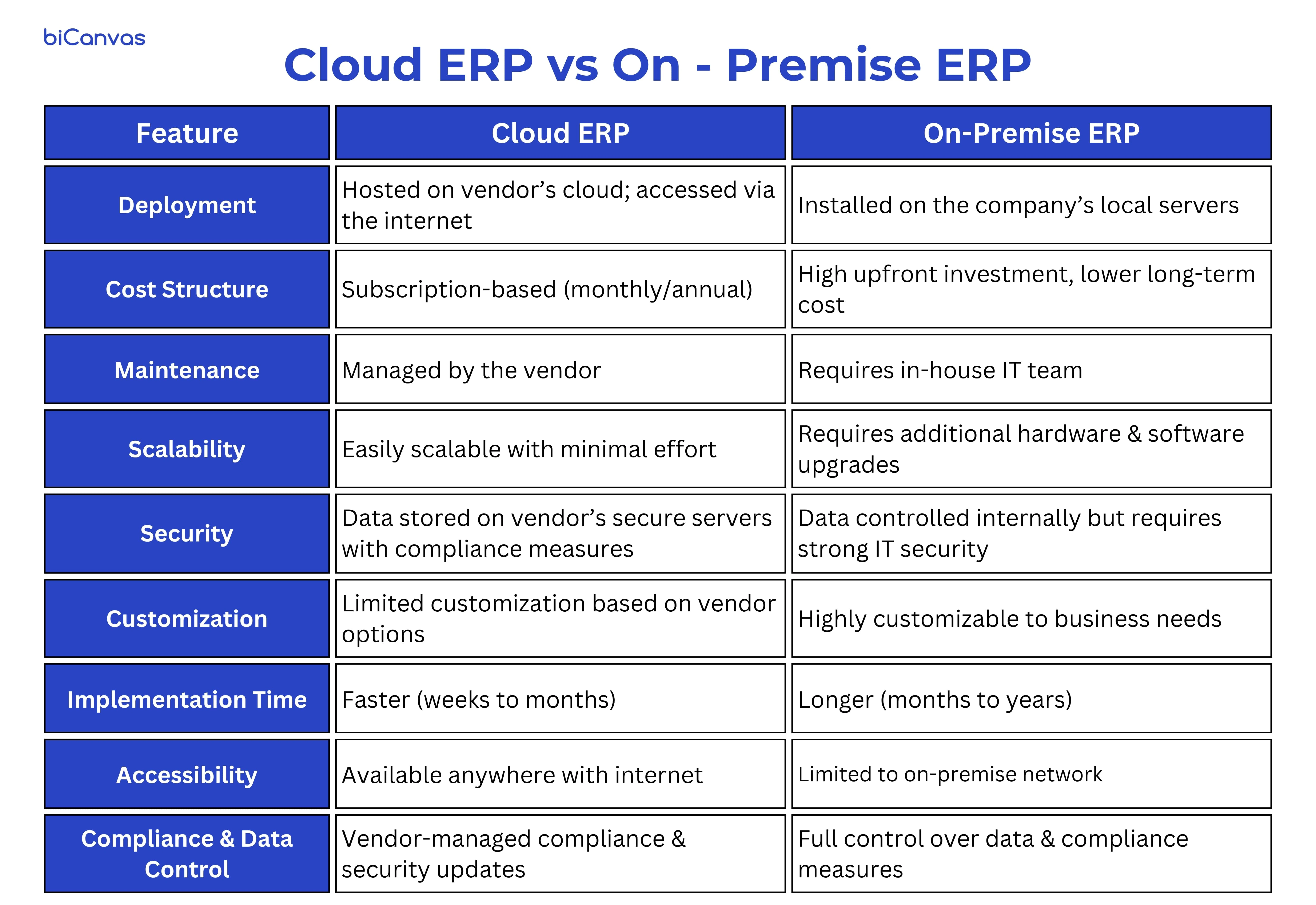
Differences: Cloud vs. On-Premise ERP

Differences Cloud vs. On-Premise ERP

Choosing the Right ERP for Your Business

Selecting the appropriate ERP for your company means finding a solution that fits your long-term growth goals, industry requirements, and workflows. A well-matched ERP system enhances visibility, simplifies processes, and improves decision-making across departments.

Cloud ERP is best for:

  • Small to mid-sized businesses with limited IT resources.
  • Companies that need remote access and flexibility.
  • Businesses looking for quick deployment and lower upfront costs.
  • Organizations that prefer automatic updates and vendor-managed security.

On-Premise ERP is best for:

  • Large enterprises that require full control over data and compliance.
  • Companies with highly complex operations that need extensive customization.
  • Industries with strict data security regulations (e.g., healthcare, finance, defense).
  • Organizations that already have an established IT infrastructure.

Conclusion: Which One Should You Choose?

The choice between cloud ERP and on-premise ERP depends on your business goals, financial resources, security preferences, and requirements for scalability.

For expanding businesses that need flexibility, reduced expenses, and easy accessibility, Cloud ERP is the preferred option.

For enterprises that prioritize data control, customization, and a sustainable investment strategy, On-Premise ERP continues to be a strong choice.

While choosing between on-premise and cloud ERPs is a major decision, knowing how ERP compares to CRM can help shape your broader tech roadmap. Read more here.

Compare features, costs, and scalability — start your ERP evaluation today. Schedule a free consultation to see which ERP model fits your business best.

Our Blogs

Our Latest Blogs

/frontend/images/blog/cloud-erp-vs-onpremise-erp
19 Jan 2024

Cloud vs. On-Premise ERP: Which One is Better for Your Business?

Industries often struggle to decide whether cloud ERP or on-premise ERP is the better choice. It depends on business-specific needs. Companies always focus on increasing their business growth and production rate. This can be achieved with the best business management software, which helps them automate their business operations. Both of them have their advantages and challenges based on company size, security, and budget.

Understanding Cloud ERP and On-Premise ERP

Cloud ERP

Businesses of all scales, ranging from startups to large corporations, utilize Cloud ERP to streamline workflow, enhance business operations, improve decision-making, and increase productivity. This system operates on a remote server and is accessed through the Internet. Businesses do not need to maintain costly hardware and IT infrastructure. Users can log in from any location using a web browser. It upgrades automatically, so companies always have the latest features.

Key Benefits of Cloud ERP:

  • Cost-Effective: No need to spend on costly servers or IT maintenance.
  • Accessible Anytime, Anywhere: Login from any device, at any time, from any location.
  • Automatic Updates: Always get the latest features without manual upgrades.
  • Enhanced Security: Advanced encryption and regular backups keep your data safe.

On-Premise ERP

This ERP system type is installed on the company's own servers and maintained by its internal IT team. It helps manage various departments such as accounting, inventory, and HR under a single umbrella. Although it is more expensive, it offers greater control and more options for customization. Industries like manufacturing, government, healthcare, and construction often prefer this model.

Key Benefits of On-Premise ERP:

  • No Internet Dependency: Works without relying on an internet connection.
  • Better Compliance: Ideal for industries with strict data regulation requirements.
  • Full Control: Businesses have complete ownership of data and system security.
  • Customization: Build ERP features tailored to specific business needs.

Challenges of On-Premise ERP:

  • High Upfront Costs: Requires significant investment in hardware and IT resources.
  • Maintenance Responsibility: Internal teams must handle updates, security, and support.
  • Limited Scalability: Scaling requires more infrastructure and higher costs.

Differences: Cloud vs. On-Premise ERP

Differences Cloud vs. On-Premise ERP

Choosing the Right ERP for Your Business

Selecting the appropriate ERP for your company means finding a solution that fits your long-term growth goals, industry requirements, and workflows. A well-matched ERP system enhances visibility, simplifies processes, and improves decision-making across departments.

Cloud ERP is best for:

  • Small to mid-sized businesses with limited IT resources.
  • Companies that need remote access and flexibility.
  • Businesses looking for quick deployment and lower upfront costs.
  • Organizations that prefer automatic updates and vendor-managed security.

On-Premise ERP is best for:

  • Large enterprises that require full control over data and compliance.
  • Companies with highly complex operations that need extensive customization.
  • Industries with strict data security regulations (e.g., healthcare, finance, defense).
  • Organizations that already have an established IT infrastructure.

Conclusion: Which One Should You Choose?

The choice between cloud ERP and on-premise ERP depends on your business goals, financial resources, security preferences, and requirements for scalability.

For expanding businesses that need flexibility, reduced expenses, and easy accessibility, Cloud ERP is the preferred option.

For enterprises that prioritize data control, customization, and a sustainable investment strategy, On-Premise ERP continues to be a strong choice.

While choosing between on-premise and cloud ERPs is a major decision, knowing how ERP compares to CRM can help shape your broader tech roadmap. Read more here.

Compare features, costs, and scalability — start your ERP evaluation today. Schedule a free consultation to see which ERP model fits your business best.

OUR BLOGS

Our Latest Blogs

img
01 Dec 2025

10 Best Enterprise Construction ERP Software in India (2026 Updated List)

Table of Contents Introduction: Why Construction Companies Need ERP in 2026 How We Selected the Top Construction ERPs (Evaluation Methodology) Top 10 Best Enterprise Construction ERP Software in India — Full List Comparison Table: Feature-by-Feature Review Which ERP Is Best for Your Company Type? (EPC, Infra, Real Estate, RMC, MEP) biCanvas — Why It Ranks #1 in 2026 Core Modules to Look For Implementation Timeline & Rollout Speed Total Cost of Ownership (TCO) FAQ   Introduction: Why Construction Companies Need ERP in 2026 Enterprise construction projects in India are operationally complex: Managing 20–200+ multi-site projects simultaneously Daily WIP updates and BOQ alignment Budget vs. actual tracking Subcontractor billing and RA bills Material planning and inventory reconciliation Statutory compliance (GST, RERA) Equipment lifecycle and preventive maintenance Site-level reporting and coordination Traditional tools like spreadsheets, WhatsApp updates, and manual reporting cannot handle this scale. Enterprise construction companies adopt ERP systems to: Prevent cost overruns Maintain project timelines Ensure BOQ accuracy Track inventory/materials Improve billing predictability Strengthen financial visibility A well-implemented enterprise construction ERP becomes the operating backbone of mid-to-large construction businesses.   How We Selected the Top Construction ERPs Our 2026 ranking uses a structured, industry-focused evaluation model based on 23 decision parameters. A. Core Construction Functionality WBS and project breakdown BOQ management & version control Procurement & indent workflows WIP tracking and daily progress reporting Subcontractor management and RA billing DPR automation and site-level approvals Budgeting, estimation & material reconciliation B. Financial & Operational Control Budget vs actual Cost center tracking Cash flow monitoring Project-level P&L GST, TDS, RERA compliance C. Deployment & Scalability Cloud performance & multi-project capability Integration readiness (API, IoT, GPS, Tally, SAP) Workflow automation & custom approval routing D. Usability & Adoption Mobile-first design Offline data capture UI/UX for site engineers Training & support availability E. Pricing & Total Cost of Ownership Licensing flexibility Implementation cost & support Upgrade policy Integration costs   Top 10 Best Enterprise Construction ERP Software in India (2026)   Note: The full list highlights enterprise-focused solutions for mid-to-large construction companies. biCanvas is positioned #1 for multi-site, EPC, and infrastructure projects. biCanvas — Enterprise construction ERP for multi-site, EPC, and infrastructure firms SAP S/4HANA (Construction) — Large-scale enterprise projects, multi-entity Oracle Construction Cloud — Portfolio-heavy infrastructure and EPC In4Suite (In4Velocity) — Real-estate focused, medium-to-large developers Procore — Large project collaboration and field management Farvision ERP — Residential developers, mid-to-large projects CMiC — Enterprise project management, construction finance Viewpoint — Construction accounting + project management Builderstorm — Mid-to-large construction firms, modular Maxwell ERP — RMC and precast-focused enterprise projects   Comparison Table — Feature-by-Feature Review Capability / Feature biCanvas (Enterprise) In4Suite SAP S/4HANA Oracle Construction Cloud Procore BOQ & WBS Management Native, versioned Native via PS/PSA via modules via integrations WIP & DPR (real-time) Mobile-first, offline Mobile support via integrations Mobile Mobile logs Subcontractor RA Billing Automated workflows Native via FI/PS Limited Limited Procurement & Indent Site/HO integrated Yes Yes via partners Yes Inventory & Intersite Transfer Location-aware Yes Yes Partial Limited Equipment Lifecycle + IoT Native + telematics Add-on Add-on via partners No Workflow Builder Visual, complex flows Basic Custom dev Configurable No Multi-Entity Consolidation Native Yes Yes Yes No Implementation (Typical) 3–6 months pilot 2–6 months 6–18 months 4–12 months 3–9 months Best Fit Mid to Large enterprises Mid to Enterprise Large enterprise Large infra & portfolios Large projects   Legend: Native/Strong — Core feature fully integrated Add-on/Partner — Available via customization or third-party Limited/No — Not available or severely restricted   Which ERP Is Best for Your Company Type?   A. Infrastructure & EPC Needs: Complex scheduling, equipment fleets, mobilization planning, subcontractor billing, audit compliance Recommendation: biCanvas — enterprise ERP for seamless WIP, accounting, and equipment integration. Primavera or scheduling add-ons may complement. B. Real Estate / Residential Developers Needs: Project accounting, CRM, sales-to-construction handover, post-sales service Recommendation: biCanvas — integrated with CRM for end-to-end construction workflows. Alternatives: In4Suite, Farvision. C. RMC & Construction Manufacturing Needs: Plant production planning, batch traceability, inventory, logistics, integrated billing Recommendation: biCanvas — with manufacturing connectors for RMC/precast operations. ERP platforms with manufacturing extensions may complement. D. Large Contractors / Multi-Project Portfolios Needs: Multi-entity consolidation, project-level P&L, intersite transfers, equipment utilization Recommendation: biCanvas — best-in-class enterprise ERP for multi-project portfolios, real-time financials, and operational visibility. Alternatives: SAP S/4HANA, Oracle.   biCanvas — Why It Ranks #1 biCanvas is a purpose-built enterprise construction ERP for mid-to-large construction, infrastructure, EPC firms, and construction manufacturing. Focused on site-to-office integration, it removes data handoffs, reduces BOQ/WIP ambiguities, and delivers CFO-grade reporting.   Key Differentiators Built-for-construction architecture — WBS, BOQ, WIP, procurement, equipment & asset lifecycle, preventive maintenance, contract management Real-time site-to-HO visibility — Mobile-first, offline, approval workflows, location-tagged evidence Advanced workflow & automation engine — Visual builder for multi-stakeholder approvals Enterprise data & controls — Multi-entity consolidation, project-level P&L, role-based access, GST compliance Integration ecosystem — Tally, Oracle, SAP, IoT/GPS, BI tools Scalable cloud-native SaaS — With hybrid/private-cloud options Domain-led UX — For field adoption Implementation playbook & governance   Core Modules Project Planning & Scheduling (WBS, Gantt) BOQ & Estimation with Version Control Work-in-Progress (WIP) & Daily Progress Reporting (DPR) Procurement, Indent & GRN workflows Subcontractor Management & RA Billing Inventory & Material Reconciliation Equipment & Asset Lifecycle + Preventive Maintenance (IoT-enabled) Financials: Project Accounting, Cost Centers, Cashflow HR & Payroll (integration-ready) Document Management & RFI/Change Control Analytics & Custom Dashboards   Core Modules to Look For in a Construction ERP When evaluating a Construction ERP for a mid-to-large scale construction or infrastructure firm, these modules are essential. Together, they form the backbone of efficient project execution, financial control, asset management, and compliance.   Module / Capability Why It Matters (Business Value) Project Planning & Scheduling (WBS, Gantt, Multi-Project) Lets you map out all tasks, dependencies, milestones across multiple projects. Enables realistic planning, workload balancing, and tracking of project timelines.   BOQ & Estimation with Version Control Construction projects involve frequent changes in scope/quantities. Versioned BOQ management ensures all changes are tracked, approved, and reflected in budget and billing, minimizing disputes and cost overruns.   Work-in-Progress (WIP) & Daily Progress Reporting (DPR) Real-time site-level updates (labor, material consumption, progress) ensure management visibility. Early detection of delays or overconsumption helps control cost and schedule.   Procurement, Indent & GRN Workflows Standardizes procurement processes, prevents duplication, manages vendor communication, and ensures material supply aligns with project schedules — reducing delays and waste.   Inventory & Material Reconciliation (Site & Intersite Transfers) Especially for multi-site companies or those with precast/RMC plants — tracks stock movement precisely, prevents theft or overuse, and ensures material availability.   Subcontractor / Vendor Management & RA Billing Automates subcontractor billing, RA bills, approvals, and payment workflows — ensures transparency, avoids manual errors, and accelerates payment cycles.   Equipment & Asset Lifecycle / Maintenance (with IoT/Telematics support) For firms with heavy machinery — tracks usage, maintenance, depreciation, preventive maintenance scheduling. Promotes better asset utilisation and reduces downtime.   Financial Management: Project-Level Accounting, Cost Centers, Cashflow & Project P&L Enables accurate financial tracking across projects, cost centers, and entities. Helps management monitor profitability, cashflow, and overall financial health of operations. HR & Payroll ( or Integration with Payroll System) For firms handling large labor force — tracks attendance, payroll, labor costs, mobilization — essential for budget control and compliance with labor laws. Document Management & Change Order / RFI / Variation Management Construction projects involve many drawings, RFIs, revisions, approvals. Centralized document control ensures version integrity, audit trail, and fast access — reducing disputes and rework.   Reporting & Analytics / Custom Dashboards / KPI Monitoring Real-time dashboards give management insight into project health, cashflow, resource utilisation, delays, costs vs budget etc. Enables proactive decisions rather than reactive firefighting.   Multi-Entity & Multi-Project Consolidation (Enterprise-ready) For companies with multiple sites, entities, divisions — allows consolidated financials, inter-site transfers, centralized control, and standardized workflows.   Compliance & Statutory Modules (GST, Tax, Audit Trails, Regulatory Compliance) In India, compliance with GST, accounting standards, tax rules, regulatory demands is mandatory. ERP must support statutory workflows to avoid penalties and maintain transparency.   Mobile Access & Offline Capabilities for Field Teams Field engineers and site staff must be able to update progress even with unreliable connectivity. Offline-capable mobile apps ensure timely reporting and data accuracy.   Workflow Automation & Approval Engine Enables customizable approval flows (for purchases, RA bills, subcontractor payments, change orders), ensuring process control, accountability, and audit readiness.   Integration Capability (Accounting Software, Payroll, IoT, GPS, BI Tools) Construction companies often use multiple systems — ERP should integrate smoothly with accounting tools, payroll systems, equipment telematics, and BI analytics to avoid silos.     Implementation Timeline (Quick Reference) Phase biCanvas (Mid-Large Enterprise) SAP S/4HANA Oracle Construction Cloud Procore Discovery & Fit-Gap 2–4 weeks 4–8 weeks 4–6 weeks 2–4 weeks Pilot (1–2 sites) 8–12 weeks 12–20 weeks 8–16 weeks 6–10 weeks Rollout (Scale) 3–6 months 6–18 months 6–12 months 3–9 months Stabilization 4–8 weeks 8–16 weeks 6–12 weeks 4–8 weeks   Total Cost of Ownership (TCO) Components: Licensing, Implementation, Training, Integrations, Infrastructure, Support, Opportunity cost. Indicative Bands: Mid-sized multi-site (10–50 projects): ₹20–60 Lakh first-year TCO Large enterprise (50+ projects, multi-site): ₹60 Lakh – ₹5 Cr+ first-year TCO   FAQ   1. What is construction ERP software and why do construction companies need it? Construction ERP software is an integrated platform that manages BOQs, project execution, billing workflows, procurement, equipment, inventory, and site updates in real time. Construction companies rely on ERP systems to reduce cost overruns, track WIP accurately, manage subcontractor billing, and maintain compliance with GST and RERA standards. 2. Which is the best construction ERP software in India for real estate and infrastructure firms? The best construction ERP software in India typically offers end-to-end modules like project planning, procurement, asset lifecycle, subcontractor management, and RERA-ready documentation. The top platforms ensure real-time visibility, faster decision-making, and predictable project execution across all sites. 3. How does ERP software for the construction industry improve project profitability? An ERP software for construction industry improves profitability by eliminating leakages in material consumption, preventing billing errors, automating WIP tracking, and aligning site operations with budgeted BOQs. Real-time dashboards help identify delays or cost escalations before they impact margins. 4. What modules should the best ERP software for construction industry include? A modern construction ERP should include project planning, BOQ management, WBS, WIP tracking, project billing, procurement management, vendor management, equipment tracking, asset maintenance, inventory control, HR & payroll, quality control, and compliance documentation. 5. How do construction management ERP software systems support multi-site operations? Construction management ERP software centralizes project data across multiple locations, allowing head office teams to monitor progress, materials, budgets, and contractor performance in real time. It eliminates manual reporting and ensures project managers are aligned across sites. 6. Is there any free construction ERP software available for small contractors? Free construction ERP software exists, but these platforms usually lack core modules like BOQ, procurement workflows, approval hierarchies, and subcontractor billing. Growing contractors prefer scalable, affordable systems that start small and expand as operations increase. 7. What is the difference between construction project management ERP software and standard ERP? Construction project management ERP software is purpose-built for WBS, BOQ, site progress, equipment utilization, and subcontractor billing—unlike generic ERPs, which lack construction-specific features such as daily progress reports (DPRs), material reconciliation, or RA bills. 8. How do top construction ERP software providers ensure compliance with GST and RERA? Leading construction ERP software providers include built-in compliance workflows for GST, RERA, and labour laws. The system generates audit-ready documents, maintains digital trails, and automates statutory reporting to avoid penalties and ensure transparency. 9. What should I look for when comparing top 10 construction ERP software in India? When comparing the top 10 construction ERP software, evaluate modules, implementation time, mobile accessibility, integration capabilities, pricing transparency, customer support, and whether the platform is tailored to Indian construction workflows like RA bills and material gate entries. 10. How does ERP software for construction companies help with subcontractor management? ERP software for construction companies automates subcontractor billing, tracks work orders against BOQ, ensures correct measurement entries, prevents overbilling, and records all revisions. It provides full transparency in contract value, scope, and work completion. 11. Does construction ERP software support real-time site-to-office communication? Yes. Construction ERP software enables real-time communication through mobile apps where site teams update WIP, material receipts, and labor availability. Office teams get instant updates, eliminating WhatsApp and manual reporting delays. 12. How useful is construction ERP software for companies operating in UAE, Qatar, and Kuwait? Construction ERP software for UAE, Qatar, and Kuwait supports local taxation, multilingual teams, and region-specific project workflows. It helps EPC, high-rise construction, and infrastructure contractors manage project documentation, budgets, and approvals per GCC norms. 13. What is included in construction ERP software modules for civil construction companies? Civil construction ERP software modules include estimation, tendering, BOQ, RCC/structural work tracking, procurement automation, equipment logs, safety audits, DPRs, material reconciliation, and contract labour management. 14. How does construction ERP software help reduce project delays? ERP systems reduce project delays by predicting material shortages, flagging schedule deviations, automating approvals, and giving project managers real-time performance analytics. Early alerts help teams avoid bottlenecks and maintain project timelines. 15. Is ERP implementation worth it for high-rise construction projects? Absolutely. High-rise construction ERP software ensures accurate BOQ execution, phase-wise scheduling, tower-wise WIP tracking, concrete consumption monitoring, and automated billing cycles—critical for managing tower, slab, MEP, and finishing cycles efficiently.      

OUR BLOGS

Our Latest Blogs

img
19 Jul 2025

Streamline Supply Chain Management with a Unified ERP

In today's fast-paced world, dealing with multiple vendors, fluctuating demands, global shipping delays, and growing client expectations makes supply chain and logistics workflows more complex. If you're managing operations with spreadsheets, phone calls, and disconnected systems, it's a recipe for delays, stockouts, or unhappy customers. This is where a unified ERP system makes all the difference. Let’s walk through, in simple terms, how ERP simplifies and streamlines supply chain operations, helps you reduce expenses, avoid chaos, and stay ahead of the competition. What Is a Unified ERP? A unified ERP (Enterprise Resource Planning) system integrates purchasing, inventory, warehousing, production, sales, logistics, and finance into one single platform. You end up with a single source of truth for your entire supply chain instead of juggling four or five disconnected tools. What Happens When You Don’t Use ERP? Many companies still manage their supply chain manually or through fragmented systems. This causes problems like: Outdated inventory data Delayed approvals and miscommunication Missed or duplicate orders No visibility into supplier performance Inaccurate forecasting and stock imbalances If that sounds familiar, it's time to adopt a better solution—ERP. How ERP Streamlines Supply Chain Operations ERP helps manage the entire supply chain in one system, simplifying the ability to monitor orders, inventory, and deliveries. It improves supply chain collaboration and reduces delays by providing real-time updates to all departments. 1. Real-Time Inventory Management ERP automatically tracks inventory across warehouses, locations, and process stages. Benefits: Know exact stock availability in real time Receive alerts before running out or overstocking Auto-update inventory upon goods receipt or shipment No more stock surprises—just a smooth inventory flow. 2. Smarter Procurement Planning ERP helps you plan purchasing based on demand, supplier lead times, and past data. Benefits: Auto-generate POs by assessing stock levels Choose suppliers by price, delivery speed, or past performance Track order status and expected delivery dates This eliminates last-minute purchases and strengthens vendor relationships. 3. Seamless Vendor & Supplier Management ERP centralizes all vendor data, including contacts, contracts, delivery logs, and performance records. Benefits: Compare supplier quotes and turnaround times easily Track delays, rejections, or compliance issues Automate vendor communication and approval workflows Vendor visibility is critical to building resilient supply chains. 4. Demand Forecasting with Data ERP leverages real-time sales and trend data to make accurate predictions about future demand. Benefits: Procure or produce just the right quantity Cut down excess inventory and storage costs Be ready for seasonal spikes or emergency orders Forecasting becomes data-driven—not guesswork. 5. Faster Order Fulfillment Once a sales order is placed, ERP activates workflows across inventory, shipping, and billing. Benefits: Faster delivery from order to dispatch Fewer fulfillment errors All departments work in sync This results in happier customers and repeat business. 6. Unified Dashboard for Decision-Makers ERP gives you live dashboards and analytics to track performance metrics across the supply chain. Benefits: Detect issues early—before they escalate Track KPIs like fulfillment rates, supplier reliability, and cost per order Make quicker, smarter decisions No more waiting for reports—your insights are live. Why It Matters More Than Ever Recent global disruptions—from pandemics to shipping backlogs—have shown us how fragile supply chains can be. Businesses need flexible, data-driven systems to handle changes without breaking down. A unified ERP helps you: React faster to market or supply disruptions Stay productive across distributed teams and locations Scale operations without creating bottlenecks This is more than just software—it’s your strategy for building resilience and growth. Conclusion Trying to manage supply chains manually is like driving blind. It’s slow, risky, and stressful. A unified ERP gives you a clear view of your operations and puts you in control—from sourcing to delivery. If your team is still stuck chasing updates, struggling with inventory errors, or reacting to surprises, it’s time to upgrade. Ready to simplify your supply chain? Discover how biCanvas ERP can give you full visibility and control across sourcing, logistics, inventory, and finance. Book your free demo today!

Chat with biCanvas